
Option Values Plugins
Option Values Plugins
Overview
Option Values plugins provide dynamic, programmatically-generated values for job options. Instead of maintaining static lists or external web services, you can create a plugin that generates option values on-demand based on your infrastructure, APIs, or business logic.
When a user prepares to run a job, Rundeck calls your plugin to populate the dropdown list with current, relevant values. This ensures users always see up-to-date choices without manual list maintenance.
What Option Values Plugins Do
Option Values plugins can:
- Query external systems - Fetch values from APIs, databases, or cloud services
- Generate dynamic lists - Compute values based on current state or conditions
- Filter and transform data - Process raw data into user-friendly options
- Provide context-aware values - Return different options based on project, user, or other context
- Integrate with infrastructure - List available servers, environments, regions, etc.
- Simplify option management - Eliminate manual updates to static option lists
When to Create an Option Values Plugin
Create an Option Values plugin when you need to:
- Dynamically list infrastructure - Servers, containers, databases, cloud resources
- Query external systems - Pull values from CMDBs, service catalogs, or APIs
- Provide environment-specific options - Different values per project or environment
- Compute values at runtime - Generate options based on current state
- Integrate with existing tools - Use existing scripts or tools to provide values
- Avoid static lists - Options change frequently and manual updates are impractical
Common Use Cases
Infrastructure Management:
- List available servers or nodes from cloud providers (AWS, Azure, GCP)
- Show available Kubernetes namespaces or pods
- Display database instances or schemas
Environment Selection:
- List deployment environments (dev, staging, production)
- Show available regions or availability zones
- Display tenant or customer names
Version Selection:
- List available application versions from artifact repository
- Show Docker image tags
- Display available release branches
Integration:
- Query ServiceNow for available change requests
- List JIRA projects or issue types
- Show available Slack channels or Teams
Option Values Plugin vs. Other Approaches
Not an Option Values Plugin if you're:
- ❌ Using a static list (use built-in "List" option type)
- ❌ Calling a simple REST API (use built-in "Remote URL" option type)
- ❌ Executing tasks on nodes (use Step Plugin)
- ❌ Discovering nodes (use Resource Model Source)
Use an Option Values Plugin if you're:
- ✅ Generating values programmatically with custom logic
- ✅ Querying systems that require authentication or complex API calls
- ✅ Processing or transforming data before presenting as options
- ✅ Providing values that change based on context (project, user, etc.)
- ✅ Integrating with systems without simple REST APIs
Quick Start with Plugin Bootstrap
Fastest Way to Start
Use the Plugin Bootstrap Tool to generate a complete Option Values plugin:
Java Plugin:
rundeck-plugin-bootstrap -n RegionSelector -t java -s Option -d ~/projects
Script Plugin:
rundeck-plugin-bootstrap -n EnvironmentList -t script -s Option -d ~/projects
This generates the complete project structure, build configuration, and template code. Then customize with your value generation logic.
Using Option Values Plugins
1. Install Your Plugin
Deploy your plugin JAR, Groovy script, or ZIP file to Rundeck's libext directory.
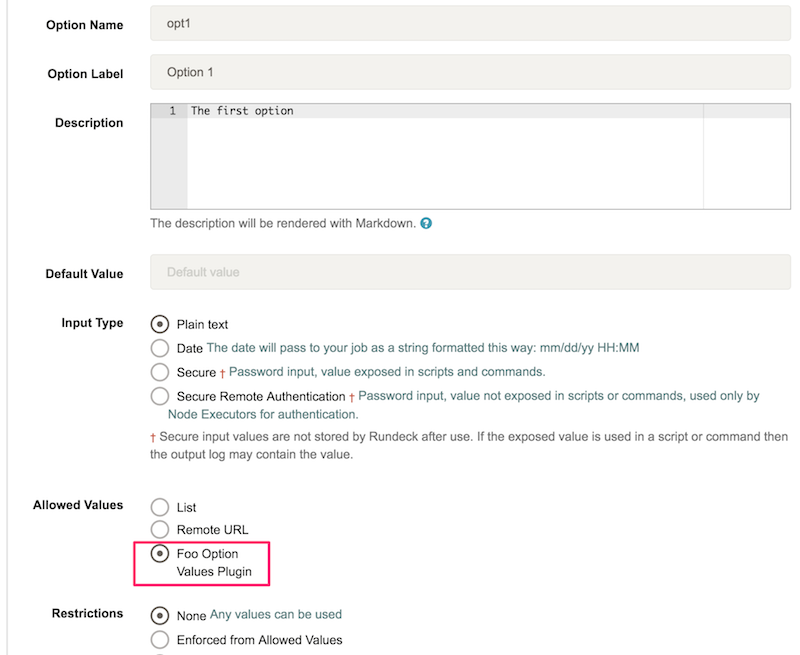
2. Configure Job Option
When creating or editing a job:
- Create a new option with type Text
- Scroll to the Allowed Values section
- Select your Option Values plugin from the dropdown
3. Execute Job
When running the job, users see the dynamically-generated values:
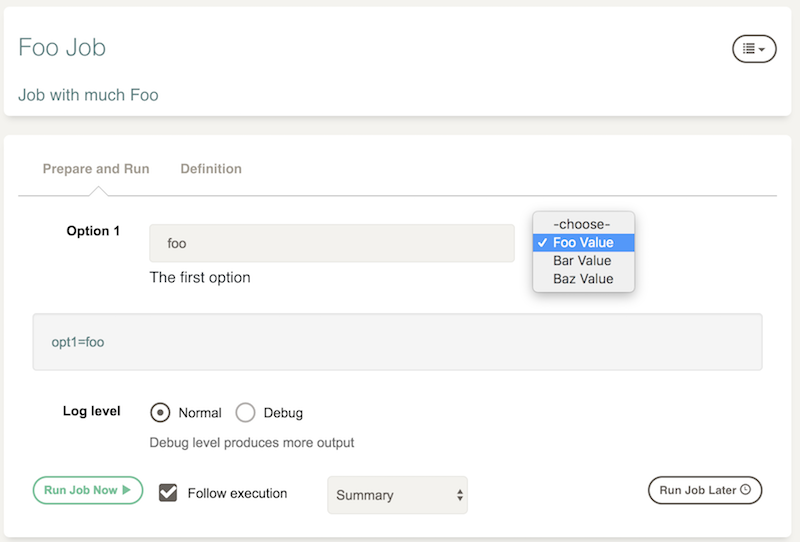
The plugin runs each time the job execution page loads, ensuring fresh values.
Plugin Configuration
Option Values plugins support configuration at framework and project scope, allowing you to define settings globally or per-project.
Framework Scope
Define in framework.properties for global configuration:
framework.plugin.OptionValues.[plugin_name].[property]=value
Example:
framework.plugin.OptionValues.aws-regions.api_endpoint=https://api.example.com
framework.plugin.OptionValues.aws-regions.default_region=us-east-1
Project Scope
Define in project.properties for project-specific configuration:
project.plugin.OptionValues.[plugin_name].[property]=value
Example:
project.plugin.OptionValues.aws-regions.filter_by_project=true
project.plugin.OptionValues.aws-regions.allowed_regions=us-east-1,us-west-2
Configuration Precedence
Project-level configuration overrides framework-level configuration. Use framework scope for defaults and project scope for overrides.
Java Plugin Implementation
Interface
Java Option Values plugins implement the OptionValuesPlugin interface:
public interface OptionValuesPlugin {
    /**
     * Get the list of option values
     * @param config plugin configuration
     * @return list of OptionValue objects
     */
    List<OptionValue> getOptionValues(Map config);
}
Method Parameters:
config- Map containing plugin configuration properties
Return Value:
List<OptionValue>- List of option values to display
Each OptionValue has:
getName()- Display label shown to usersgetValue()- Actual value passed to the job option
Basic Example
package com.example.rundeck.plugin;

import com.dtolabs.rundeck.core.plugins.Plugin;
import com.dtolabs.rundeck.plugins.descriptions.*;
import com.dtolabs.rundeck.plugins.option.OptionValue;
import com.dtolabs.rundeck.plugins.option.OptionValuesPlugin;

import java.util.ArrayList;
import java.util.List;
import java.util.Map;

@Plugin(service = "OptionValues", name = "environment-selector")
@PluginDescription(title = "Environment Selector",
                  description = "Provides list of deployment environments")
public class EnvironmentOptionValues implements OptionValuesPlugin {

    @PluginProperty(title = "Include Production",
                   description = "Include production environment",
                   defaultValue = "false")
    private boolean includeProduction;

    @Override
    public List<OptionValue> getOptionValues(Map config) {
        List<OptionValue> options = new ArrayList<>();

        options.add(new StandardOptionValue("Development", "dev"));
        options.add(new StandardOptionValue("Staging", "staging"));

        if (includeProduction) {
            options.add(new StandardOptionValue("Production", "prod"));
        }

        return options;
    }

    // Inner class implementing OptionValue
    static class StandardOptionValue implements OptionValue {
        private final String name;
        private final String value;

        StandardOptionValue(String name, String value) {
            this.name = name;
            this.value = value;
        }

        @Override
        public String getName() {
            return name;
        }

        @Override
        public String getValue() {
            return value;
        }
    }
}
Complete Example with API Integration
package com.example.rundeck.plugin;

import com.dtolabs.rundeck.core.plugins.Plugin;
import com.dtolabs.rundeck.plugins.descriptions.*;
import com.dtolabs.rundeck.plugins.option.OptionValue;
import com.dtolabs.rundeck.plugins.option.OptionValuesPlugin;

import java.net.http.*;
import java.net.URI;
import java.util.*;
import com.google.gson.Gson;
import com.google.gson.reflect.TypeToken;

@Plugin(service = "OptionValues", name = "aws-regions")
@PluginDescription(title = "AWS Regions",
                  description = "Lists available AWS regions from API")
@PluginMetadata(key = "faicon", value = "aws")
public class AwsRegionOptionValues implements OptionValuesPlugin {

    @PluginProperty(title = "API Endpoint",
                   description = "AWS API endpoint",
                   required = true,
                   defaultValue = "https://api.aws.amazon.com/regions")
    private String apiEndpoint;

    @PluginProperty(title = "API Key",
                   description = "API authentication key",
                   scope = PropertyScope.Project)
    @SelectValues(values = {})
    @PluginRenderingOptions({
        @PluginRenderingOption(key = StringRenderingConstants.DISPLAY_TYPE_KEY,
                              value = "PASSWORD"),
        @PluginRenderingOption(key = StringRenderingConstants.SELECTION_ACCESSOR_KEY,
                              value = StringRenderingConstants.SELECTION_ACCESSOR_STORAGE_PATH)
    })
    private String apiKey;

    @PluginProperty(title = "Filter Pattern",
                   description = "Regex to filter region names (optional)")
    private String filterPattern;

    @Override
    public List<OptionValue> getOptionValues(Map config) {
        try {
            // Fetch regions from API
            List<Region> regions = fetchRegionsFromApi();

            // Filter if pattern provided
            if (filterPattern != null && !filterPattern.isEmpty()) {
                regions = regions.stream()
                    .filter(r -> r.getName().matches(filterPattern))
                    .collect(Collectors.toList());
            }

            // Convert to OptionValue list
            List<OptionValue> options = new ArrayList<>();
            for (Region region : regions) {
                options.add(new StandardOptionValue(
                    region.getDisplayName(),
                    region.getCode()
                ));
            }

            // Sort alphabetically by display name
            options.sort(Comparator.comparing(OptionValue::getName));

            return options;

        } catch (Exception e) {
            System.err.println("Failed to fetch regions: " + e.getMessage());
            e.printStackTrace();

            // Return fallback options on error
            return getFallbackOptions();
        }
    }

    private List<Region> fetchRegionsFromApi() throws Exception {
        HttpClient client = HttpClient.newBuilder()
            .connectTimeout(Duration.ofSeconds(10))
            .build();

        HttpRequest request = HttpRequest.newBuilder()
            .uri(URI.create(apiEndpoint))
            .header("Authorization", "Bearer " + apiKey)
            .header("Accept", "application/json")
            .GET()
            .build();

        HttpResponse<String> response = client.send(request,
            HttpResponse.BodyHandlers.ofString());

        if (response.statusCode() != 200) {
            throw new RuntimeException("API returned status: " + response.statusCode());
        }

        // Parse JSON response
        Gson gson = new Gson();
        return gson.fromJson(response.body(),
            new TypeToken<List<Region>>(){}.getType());
    }

    private List<OptionValue> getFallbackOptions() {
        List<OptionValue> fallback = new ArrayList<>();
        fallback.add(new StandardOptionValue("US East (N. Virginia)", "us-east-1"));
        fallback.add(new StandardOptionValue("US West (Oregon)", "us-west-2"));
        fallback.add(new StandardOptionValue("EU (Ireland)", "eu-west-1"));
        return fallback;
    }

    // Helper classes
    static class Region {
        private String name;
        private String code;
        private String displayName;

        public String getName() { return name; }
        public String getCode() { return code; }
        public String getDisplayName() { return displayName; }
    }

    static class StandardOptionValue implements OptionValue {
        private final String name;
        private final String value;

        StandardOptionValue(String name, String value) {
            this.name = name;
            this.value = value;
        }

        @Override
        public String getName() { return name; }

        @Override
        public String getValue() { return value; }
    }
}
Configuration Properties
Define configuration using Plugin Annotations. See Plugin Properties for complete documentation.
Common properties for Option Values plugins:
- API endpoints or URLs
- Authentication credentials (use Key Storage)
- Filter or search criteria
- Caching settings
- Fallback values
Groovy Plugin Implementation
Groovy Option Values plugins provide a simplified DSL for quick development.
Setup
Create a file named MyOptionValuesPlugin.groovy in Rundeck's libext directory and restart Rundeck.
See Groovy Plugin Development for complete Groovy plugin documentation.
Basic Example
import com.dtolabs.rundeck.plugins.option.OptionValuesPlugin

rundeckPlugin(OptionValuesPlugin) {
    title = 'Environment Selector'
    description = 'Provides deployment environment options'
    version = '1.0'

    configuration {
        include_prod(
            title: 'Include Production',
            type: 'Boolean',
            defaultValue: 'false',
            description: 'Include production environment in list'
        )
    }

    getOptionValues { config ->
        def options = []
        options.add([name: 'Development', value: 'dev'])
        options.add([name: 'Staging', value: 'staging'])

        if (config.include_prod == 'true') {
            options.add([name: 'Production', value: 'prod'])
        }

        return options
    }
}
Complete Example with API Integration
import com.dtolabs.rundeck.plugins.option.OptionValuesPlugin
import groovy.json.JsonSlurper

rundeckPlugin(OptionValuesPlugin) {
    title = 'Kubernetes Namespaces'
    description = 'Lists available Kubernetes namespaces'
    version = '1.0'

    metadata = [
        faicon: 'dharmachakra'
    ]

    configuration {
        api_server(
            title: 'Kubernetes API Server',
            description: 'Kubernetes API server URL',
            required: true,
            defaultValue: 'https://kubernetes.default.svc'
        )

        api_token(
            title: 'API Token',
            description: 'Kubernetes service account token',
            required: true,
            scope: 'Project'
        )

        filter_pattern(
            title: 'Filter Pattern',
            description: 'Regex pattern to filter namespaces (optional)',
            required: false
        )
    }

    getOptionValues { config ->
        try {
            // Fetch namespaces from Kubernetes API
            def namespaces = fetchNamespaces(
                config.api_server,
                config.api_token
            )

            // Filter if pattern provided
            if (config.filter_pattern) {
                namespaces = namespaces.findAll { ns ->
                    ns.matches(config.filter_pattern)
                }
            }

            // Convert to option format
            def options = namespaces.collect { ns ->
                [name: ns, value: ns]
            }

            // Sort alphabetically
            options.sort { it.name }

            return options

        } catch (Exception e) {
            System.err.println("Failed to fetch namespaces: ${e.message}")
            e.printStackTrace()

            // Return fallback options
            return [
                [name: 'default', value: 'default'],
                [name: 'kube-system', value: 'kube-system']
            ]
        }
    }
}

def fetchNamespaces(String apiServer, String token) {
    def url = "${apiServer}/api/v1/namespaces"
    def connection = new URL(url).openConnection()

    connection.setRequestMethod('GET')
    connection.setRequestProperty('Authorization', "Bearer ${token}")
    connection.setRequestProperty('Accept', 'application/json')
    connection.setConnectTimeout(10000)
    connection.setReadTimeout(10000)

    if (connection.responseCode != 200) {
        throw new RuntimeException("API returned status: ${connection.responseCode}")
    }

    def json = new JsonSlurper().parse(connection.inputStream)
    return json.items.collect { it.metadata.name }
}
Accessing Configuration
Configuration values are available in the config map:
getOptionValues { config ->
    def endpoint = config.api_endpoint
    def apiKey = config.api_key
    def includeInactive = config.include_inactive == 'true'

    // Use configuration values
}
Return Format
Return a list of maps with name and value keys:
getOptionValues { config ->
    [
        [name: 'Display Label 1', value: 'actual_value_1'],
        [name: 'Display Label 2', value: 'actual_value_2'],
        [name: 'Display Label 3', value: 'actual_value_3']
    ]
}
name- What users see in the dropdownvalue- What gets passed to the job option
Script Plugin Implementation
Script-based Option Values plugins allow you to use shell scripts, Python, Ruby, or any executable to generate option values.
See Script Plugin Development for general script plugin documentation.
Output Format
Scripts must output options between special markers:
echo "==START_OPTIONS=="
echo "value1:Display Label 1"
echo "value2:Display Label 2"
echo "value3:Display Label 3"
echo "==END_OPTIONS=="
Format: value:label
value- Actual value passed to the job optionlabel- Display text shown to users
Basic Example
plugin.yaml:
name: Environment Selector
version: 1.0
rundeckPluginVersion: 1.2
author: Ops Team

providers:
  - name: environment-selector
    service: OptionValues
    plugin-type: script
    script-interpreter: /bin/bash
    script-file: environments.sh
    config:
      - name: include_production
        title: Include Production
        type: Boolean
        default: false
contents/environments.sh:
#!/bin/bash

# Configuration available as RD_CONFIG_*
INCLUDE_PROD="${RD_CONFIG_INCLUDE_PRODUCTION}"

echo "==START_OPTIONS=="
echo "dev:Development"
echo "staging:Staging"

if [ "$INCLUDE_PROD" = "true" ]; then
    echo "prod:Production"
fi

echo "==END_OPTIONS=="
Complete Example with API Call
contents/aws-regions.sh:
#!/bin/bash

# Configuration from plugin.yaml
API_ENDPOINT="${RD_CONFIG_API_ENDPOINT}"
API_KEY="${RD_CONFIG_API_KEY}"
FILTER="${RD_CONFIG_FILTER_PATTERN}"

# Fetch regions from API
REGIONS=$(curl -s \
  -H "Authorization: Bearer ${API_KEY}" \
  -H "Accept: application/json" \
  "${API_ENDPOINT}/regions")

# Check for errors
if [ $? -ne 0 ]; then
    echo "ERROR: Failed to fetch regions" >&2
    # Provide fallback options
    echo "==START_OPTIONS=="
    echo "us-east-1:US East (N. Virginia)"
    echo "us-west-2:US West (Oregon)"
    echo "==END_OPTIONS=="
    exit 0
fi

# Parse JSON and output options
echo "==START_OPTIONS=="

echo "$REGIONS" | jq -r '.regions[] | "\(.code):\(.name)"' | \
while read -r line; do
    # Apply filter if provided
    if [ -n "$FILTER" ]; then
        if echo "$line" | grep -qE "$FILTER"; then
            echo "$line"
        fi
    else
        echo "$line"
    fi
done

echo "==END_OPTIONS=="
Using External Tools
You can use existing tools like rd CLI, kubectl, aws, etc.:
contents/k8s-namespaces.sh:
#!/bin/bash

# Source kubectl config
export KUBECONFIG="${RD_CONFIG_KUBECONFIG_PATH}"

echo "==START_OPTIONS=="

# List namespaces using kubectl
kubectl get namespaces -o json | \
  jq -r '.items[].metadata.name' | \
  while read -r ns; do
    echo "${ns}:${ns}"
  done

echo "==END_OPTIONS=="
Available Environment Variables
Rundeck provides these environment variables to your script:
| Variable | Description |
|---|---|
RD_PLUGIN_SCRIPTFILE | Path to your script file |
RD_PLUGIN_FILE | Path to plugin directory |
RD_PLUGIN_BASE | Base plugin cache directory |
RD_CONFIG_* | Configuration properties (uppercase with underscores) |
PWD | Current working directory |
Accessing Configuration:
If your plugin.yaml defines:
config:
  - name: api_endpoint
  - name: filter_pattern
Your script receives:
RD_CONFIG_API_ENDPOINTRD_CONFIG_FILTER_PATTERN
Using rd CLI
Integrate with Rundeck's own CLI:
#!/bin/bash

# Source rd CLI configuration
source ~/.rd/rd.conf

echo "==START_OPTIONS=="

# List projects using rd CLI
rd projects list --format "%name" | while read -r project; do
    echo "${project}:${project}"
done

echo "==END_OPTIONS=="
Error Handling
Always handle errors gracefully and provide fallback options:
#!/bin/bash

fetch_options() {
    # Attempt to fetch from external source
    curl -sf "${API_ENDPOINT}" || return 1
}

echo "==START_OPTIONS=="

if OPTIONS=$(fetch_options); then
    # Success - output fetched options
    echo "$OPTIONS" | process_output
else
    # Failure - provide fallback
    echo "default:Default Option"
    echo "fallback:Fallback Option"
fi

echo "==END_OPTIONS=="
Best Practices
- Always output markers - Even on error, output
==START_OPTIONS==and==END_OPTIONS== - Provide fallbacks - Return sensible defaults if external calls fail
- Handle timeouts - Set timeouts on external calls
- Log errors to stderr - Use
>&2for error messages - Exit cleanly - Always exit 0 (errors in options, not script execution)
- Validate input - Check configuration values before using them
Example with all best practices:
#!/bin/bash
set -euo pipefail

# Configuration with defaults
API_URL="${RD_CONFIG_API_URL:-https://api.example.com}"
TIMEOUT="${RD_CONFIG_TIMEOUT:-10}"

# Fallback options
FALLBACK_OPTIONS="default:Default\nbackup:Backup"

# Fetch with timeout and error handling
fetch_options() {
    curl -sf --max-time "$TIMEOUT" "$API_URL" 2>&1
}

# Always output markers
echo "==START_OPTIONS=="

if OPTIONS=$(fetch_options); then
    echo "$OPTIONS" | jq -r '.[] | "\(.value):\(.label)"'
else
    echo "ERROR: Failed to fetch options, using fallback" >&2
    echo -e "$FALLBACK_OPTIONS"
fi

echo "==END_OPTIONS=="
exit 0
Best Practices
Performance
Cache when possible:
- External API calls add latency when users load the job execution page
- Consider caching results if values don't change frequently
- Balance freshness vs. performance
Set timeouts:
HttpClient client = HttpClient.newBuilder()
    .connectTimeout(Duration.ofSeconds(10))
    .build();
Limit result size:
- Don't return thousands of options (poor UX)
- Filter or paginate large result sets
- Consider adding search/filter configuration
Error Handling
Always provide fallback options:
try {
    return fetchOptionsFromApi();
} catch (Exception e) {
    System.err.println("Failed to fetch options: " + e.getMessage());
    return getFallbackOptions();
}
Log errors appropriately:
- Use
System.err.println()for errors - Include context (what failed, why)
- Don't expose sensitive information in logs
Security
Use Key Storage for credentials:
@PluginProperty(title = "API Key", scope = PropertyScope.Project)
@SelectValues(values = {})
@PluginRenderingOptions({
    @PluginRenderingOption(key = StringRenderingConstants.DISPLAY_TYPE_KEY,
                          value = "PASSWORD"),
    @PluginRenderingOption(key = StringRenderingConstants.SELECTION_ACCESSOR_KEY,
                          value = StringRenderingConstants.SELECTION_ACCESSOR_STORAGE_PATH)
})
private String apiKey;
Validate input:
- Sanitize configuration values
- Validate URLs and endpoints
- Check for injection attacks in script plugins
User Experience
Provide meaningful labels:
// Good: Clear, descriptive labels
new StandardOptionValue("US East (N. Virginia)", "us-east-1")

// Bad: Technical codes only
new StandardOptionValue("us-east-1", "us-east-1")
Sort options logically:
- Alphabetically by label (most common)
- By priority or frequency of use
- Grouped by category
Handle empty results:
if (options.isEmpty()) {
    options.add(new StandardOptionValue(
        "No options available",
        "none"
    ));
}
Troubleshooting
Plugin Not Appearing
Check:
- Rundeck restarted after installing plugin
- Plugin JAR/file in correct
libextdirectory - No errors in Rundeck logs during plugin loading
- Feature flag enabled (if using older Rundeck versions):
rundeck.feature.option-values-plugin.enabled=trueinrundeck-config.properties
Tips
In modern Rundeck versions and Rundeck Enterprise, Option Values plugins are enabled by default.
No Values Displayed
Check:
- Plugin returning non-empty list
- No exceptions thrown in plugin code
- Check Rundeck logs for errors
- Verify configuration properties are correct
Values Not Updating
Remember:
- Values are fetched each time job execution page loads
- Browser caching may show old values (hard refresh)
- Check if plugin is actually being called (add logging)
Related Documentation
- Job Options (User Guide) - Configuring job options
- Java Plugin Development - General Java plugin development
- Groovy Plugin Development - General Groovy plugin development
- Script Plugin Development - General script plugin development
- Plugin Properties - Configuration property reference