
Logging Plugins
Logging Plugins
Overview
Logging plugins control where and how Rundeck stores execution logs. By default, Rundeck writes logs to local disk (var/logs), but this isn't suitable for cloud environments, clustering, or long-term retention. Logging plugins enable you to send logs to external systems for storage, analysis, compliance, and monitoring.
Common Use Cases:
Cloud Storage & Clustering:
- Store logs in S3 for ephemeral cloud deployments
- Use Azure Blob Storage when running Rundeck in Azure
- Centralize logs in Google Cloud Storage for GCP environments
- Enable clustering by storing logs externally (multiple Rundeck servers)
Monitoring & Analytics:
- Stream logs to CloudWatch for AWS monitoring and alerts
- Send logs to Splunk for centralized log management
- Forward to Elasticsearch for searching and analysis
- Push to Datadog or other APM tools for observability
Compliance & Retention:
- Archive logs to S3 Glacier for long-term retention
- Store logs in compliant storage (HIPAA, SOC 2, etc.)
- Maintain audit trails for regulatory requirements
- Implement custom retention policies
Real-Time Integration:
- Stream logs to Kafka for real-time processing
- Send to Syslog for SIEM integration
- Forward to custom webhooks or APIs
- Trigger alerts based on log content
Real-World Examples:
- E-commerce company stores all execution logs in S3, archives after 90 days to Glacier
- Financial institution streams logs to Splunk for compliance auditing
- SaaS startup uses CloudWatch for real-time alerting on job failures
- Healthcare provider encrypts logs and stores in compliant Azure storage
- DevOps team clusters 3 Rundeck servers, all writing/reading from shared S3 bucket
Benefits:
- No Local Disk Dependency - Logs persist beyond server lifecycle
- Clustering Support - Multiple Rundeck instances share logs
- Compliance - Meet retention and audit requirements
- Scalability - Cloud storage scales infinitely
- Integration - Connect to existing monitoring/logging infrastructure
- Cost Optimization - Use tiered storage (hot/cold/archive)
How Rundeck Logging Works
Architecture
When Rundeck executes a job, it generates log events containing:
- Command output from each step
- Node names and timestamps
- Execution context and metadata
- Step results and state information
These log events flow through a pluggable logging system with three components:
1. Streaming Log Writers - Where logs are sent during execution
2. Streaming Log Readers - Where logs are read from for display
3. Execution File Storage - Where complete log files are stored/retrieved
Default Behavior (Local File Log)
By default, Rundeck uses the Local File Log:
- Writes logs to
var/logs/rundeck/{project}/{execution-id}.rdlog - Stores execution state to
var/logs/rundeck/{project}/{execution-id}.state.json - Works well for single server, persistent disk
Three Plugin Types
1. StreamingLogWriter (Real-time Output)
Purpose: Send log events somewhere as they happen during execution.
When to Use:
- Real-time monitoring (CloudWatch, Datadog)
- Log aggregation (Splunk, Elasticsearch)
- Custom alerting systems
- Audit trail duplication
Architecture:
Job Execution → Log Events → Writer Plugin(s) → External System(s)
                           ↓
                        Local File Log (optional)
Multiple writers can be configured simultaneously.

Examples:
- CloudWatch Writer - Streams logs to AWS CloudWatch Logs
- Splunk Writer - Forwards log events to Splunk HTTP Event Collector
- Syslog Writer - Sends logs to syslog server
- Custom API Writer - POSTs log events to your API
2. StreamingLogReader (Real-time Display)
Purpose: Read log events from external system for display in Rundeck UI/API.
When to Use:
- Completely replace local file storage
- Read from centralized log system
- Custom log storage backend
Architecture:
Rundeck UI/API → Reader Plugin → External System
                ↓
             Display Logs

Examples:
- CloudWatch Reader - Reads logs from CloudWatch Logs
- S3 Reader - Streams logs directly from S3 objects
- Database Reader - Queries logs from database
Note: Readers and Writers usually come in pairs for complete replacement of Local File Log.
3. ExecutionFileStorage (Batch Storage/Retrieval)
Purpose: Store and retrieve complete log files after execution completes.
When to Use:
- Cloud deployments (ephemeral disks)
- Rundeck clustering (shared log storage)
- Long-term log archival
- Backup/disaster recovery
This is the most common plugin type for customers.
Architecture:
Execution Complete → Local File Log → Storage Plugin → External Storage
                                                         (S3, Azure Blob, etc.)

Later...

User Views Log → Local File Missing → Storage Plugin Retrieves → Local Cache
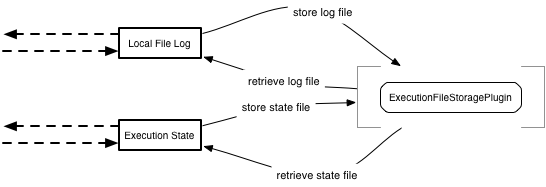
Flow:
- During execution, logs written to local disk (fast)
- After completion, logs asynchronously uploaded to storage plugin
- Local logs can be cleaned up (disk space)
- When user views log, plugin retrieves from storage if needed
- Retrieved logs cached locally for performance
Examples:
- S3 Storage - Stores logs in AWS S3 buckets
- Azure Blob Storage - Stores logs in Azure Storage
- GCS Storage - Stores logs in Google Cloud Storage
- Custom Storage - Your own storage backend
When to Use Which Type
Decision Matrix
| Scenario | Recommended Plugin Type | Why |
|---|---|---|
| Cloud deployment (AWS, Azure, GCP) | ExecutionFileStorage | Ephemeral disks, need external storage |
| Rundeck Clustering | ExecutionFileStorage | All servers access shared logs |
| Real-time monitoring | StreamingLogWriter | Live log streaming to monitoring tools |
| Compliance/Audit | StreamingLogWriter + ExecutionFileStorage | Real-time audit trail + long-term storage |
| Replace local storage entirely | StreamingLogWriter + StreamingLogReader | Complete custom backend |
| Backup existing logs | ExecutionFileStorage | Keep local, backup remotely |
| SIEM integration | StreamingLogWriter | Forward logs to security tools |
Common Patterns
Pattern 1: Cloud Storage Only (Most Common)
Local File Log → ExecutionFileStorage (S3/Azure/GCS)
- Logs written locally during execution (fast)
- Uploaded to cloud storage after completion
- Retrieved when needed
- Local logs can be deleted
Pattern 2: Real-Time + Cloud Storage
StreamingLogWriter (CloudWatch) + ExecutionFileStorage (S3)
- Real-time monitoring in CloudWatch
- Long-term storage in S3
- Best of both worlds
Pattern 3: Complete Replacement
StreamingLogWriter (Custom) + StreamingLogReader (Custom)
- No local file log
- All logs in external system
- Requires paired reader/writer
Pattern 4: Audit Duplication
Local File Log + StreamingLogWriter (Syslog/Splunk)
- Normal local logging
- Duplicate to audit/SIEM system
- Compliance requirement
Quick Start: S3 Storage Example
The most common use case is storing logs in S3. Here's a complete working example:
package com.example.rundeck.logging;

import com.dtolabs.rundeck.core.logging.ExecutionFileStorageException;
import com.dtolabs.rundeck.core.plugins.Plugin;
import com.dtolabs.rundeck.plugins.ServiceNameConstants;
import com.dtolabs.rundeck.plugins.descriptions.*;
import com.dtolabs.rundeck.plugins.logging.ExecutionFileStoragePlugin;
import software.amazon.awssdk.core.sync.RequestBody;
import software.amazon.awssdk.services.s3.S3Client;
import software.amazon.awssdk.services.s3.model.*;

import java.io.*;
import java.util.*;

@Plugin(name = "s3-log-storage", service = ServiceNameConstants.ExecutionFileStorage)
@PluginDescription(title = "S3 Log Storage", description = "Stores execution logs in AWS S3")
public class S3LogStoragePlugin implements ExecutionFileStoragePlugin {

    @PluginProperty(title = "S3 Bucket", description = "S3 bucket name", required = true)
    private String bucket;

    @PluginProperty(title = "Path Pattern",
        description = "Path pattern for log files (use ${project}, ${execid})",
        required = false,
        defaultValue = "rundeck-logs/${project}/${execid}")
    private String pathPattern;

    @PluginProperty(title = "AWS Region", required = false, defaultValue = "us-east-1")
    private String region;

    private S3Client s3Client;
    private Map<String, Object> context;

    @Override
    public void initialize(Map<String, ? extends Object> context) {
        this.context = new HashMap<>(context);
        this.s3Client = S3Client.builder()
            .region(software.amazon.awssdk.regions.Region.of(region))
            .build();
    }

    @Override
    public boolean isAvailable(String filetype) throws ExecutionFileStorageException {
        try {
            String key = buildS3Key(filetype);
            HeadObjectRequest request = HeadObjectRequest.builder()
                .bucket(bucket)
                .key(key)
                .build();

            s3Client.headObject(request);
            return true;  // File exists
        } catch (NoSuchKeyException e) {
            return false;  // File doesn't exist
        } catch (Exception e) {
            throw new ExecutionFileStorageException(
                "Error checking S3 availability: " + e.getMessage(), e);
        }
    }

    @Override
    public boolean store(String filetype, InputStream stream, long length, Date lastModified)
            throws IOException, ExecutionFileStorageException {
        try {
            String key = buildS3Key(filetype);

            PutObjectRequest request = PutObjectRequest.builder()
                .bucket(bucket)
                .key(key)
                .contentLength(length)
                .build();

            s3Client.putObject(request, RequestBody.fromInputStream(stream, length));
            return true;
        } catch (Exception e) {
            throw new ExecutionFileStorageException(
                "Error storing to S3: " + e.getMessage(), e);
        }
    }

    @Override
    public boolean retrieve(String filetype, OutputStream stream)
            throws IOException, ExecutionFileStorageException {
        try {
            String key = buildS3Key(filetype);

            GetObjectRequest request = GetObjectRequest.builder()
                .bucket(bucket)
                .key(key)
                .build();

            try (InputStream s3Stream = s3Client.getObject(request)) {
                byte[] buffer = new byte[8192];
                int bytesRead;
                while ((bytesRead = s3Stream.read(buffer)) != -1) {
                    stream.write(buffer, 0, bytesRead);
                }
            }
            return true;
        } catch (NoSuchKeyException e) {
            return false;  // File not found
        } catch (Exception e) {
            throw new ExecutionFileStorageException(
                "Error retrieving from S3: " + e.getMessage(), e);
        }
    }

    private String buildS3Key(String filetype) {
        // Expand path pattern with context variables
        String path = pathPattern
            .replace("${project}", String.valueOf(context.get("project")))
            .replace("${execid}", String.valueOf(context.get("execid")));

        return path + "." + filetype;
    }
}
What This Does:
- Stores logs in S3 after execution completes
- Uses path pattern:
rundeck-logs/{project}/{execution-id}.rdlog - Retrieves logs when user views execution
- Supports clustering (multiple Rundeck servers use same bucket)
Configuration (in framework.properties or project config):
framework.plugin.ExecutionFileStorage.s3-log-storage.bucket=my-rundeck-logs
framework.plugin.ExecutionFileStorage.s3-log-storage.region=us-east-1
framework.plugin.ExecutionFileStorage.s3-log-storage.pathPattern=logs/${project}/${execid}
Best Practices
1. Handle Errors Gracefully
@Override
public boolean store(String filetype, InputStream stream, long length, Date lastModified) {
    try {
        // Attempt storage
        uploadToStorage(stream);
        return true;
    } catch (Exception e) {
        // Log error but don't crash Rundeck
        System.err.println("Storage failed: " + e.getMessage());
        return false;  // Will retry later
    }
}
Why: If your plugin throws unhandled exceptions, it can fail job executions. Return false to indicate failure and allow Rundeck to retry.
2. Implement Timeouts
S3Client s3 = S3Client.builder()
    .overrideConfiguration(config -> config
        .apiCallTimeout(Duration.ofSeconds(30))
        .apiCallAttemptTimeout(Duration.ofSeconds(10)))
    .build();
Why: Network operations can hang indefinitely. Always set timeouts to prevent blocking.
3. Use Buffered Streams
// Bad - reads byte by byte
s3Stream.transferTo(outputStream);

// Good - buffers for performance
try (BufferedInputStream buffered = new BufferedInputStream(s3Stream, 8192)) {
    byte[] buffer = new byte[8192];
    int bytesRead;
    while ((bytesRead = buffered.read(buffer)) != -1) {
        outputStream.write(buffer, 0, bytesRead);
    }
}
Why: Unbuffered streams are extremely slow for large files. Buffer sizes of 8KB-64KB work well.
4. Close Resources Properly
@Override
public boolean retrieve(String filetype, OutputStream stream) {
    InputStream s3Stream = null;
    try {
        s3Stream = s3Client.getObject(request);
        // ... copy to output stream
        return true;
    } catch (Exception e) {
        return false;
    } finally {
        if (s3Stream != null) {
            try { s3Stream.close(); } catch (IOException ignored) {}
        }
    }
}
Why: Leaked resources cause memory issues and connection exhaustion. Use try-with-resources or finally blocks.
5. Support Execution Import
Handle imported executions correctly:
@Override
public void initialize(Map<String, ? extends Object> context) {
    this.context = context;

    // Check if this is an imported execution
    boolean isRemote = "true".equals(context.get("isRemoteFilePath"));

    if (isRemote) {
        // Use outputfilepath directly
        this.logPath = (String) context.get("outputfilepath");
        this.execId = (String) context.get("execIdForLogStore");
    } else {
        // Use normal path pattern
        this.logPath = expandPathPattern();
        this.execId = (String) context.get("execid");
    }
}
Why: Imported executions may have different paths. Check isRemoteFilePath context variable (v4.17.0+).
6. Validate Configuration
@Override
public void initialize(Map<String, ? extends Object> context) {
    if (bucket == null || bucket.trim().isEmpty()) {
        throw new IllegalArgumentException("S3 bucket is required");
    }

    if (!bucket.matches("^[a-z0-9][a-z0-9.-]*[a-z0-9]$")) {
        throw new IllegalArgumentException("Invalid S3 bucket name: " + bucket);
    }

    // Initialize client
    this.s3Client = S3Client.builder()
        .region(Region.of(region))
        .build();
}
Why: Fail fast with clear error messages. Don't wait until store/retrieve to discover config problems.
7. Log Plugin Activity
@Override
public boolean store(String filetype, InputStream stream, long length, Date lastModified) {
    String key = buildS3Key(filetype);
    System.out.println("Storing " + filetype + " to s3://" + bucket + "/" + key);

    try {
        // ... storage logic
        System.out.println("Successfully stored " + length + " bytes");
        return true;
    } catch (Exception e) {
        System.err.println("Storage failed: " + e.getMessage());
        e.printStackTrace();
        return false;
    }
}
Why: Plugin activity appears in Rundeck's service log, helping with troubleshooting.
8. Consider Multipart Uploads (Large Files)
For files > 100MB, use multipart uploads:
if (length > 100 * 1024 * 1024) {  // 100MB
    // Use multipart upload
    CreateMultipartUploadRequest createRequest = CreateMultipartUploadRequest.builder()
        .bucket(bucket)
        .key(key)
        .build();

    CreateMultipartUploadResponse response = s3Client.createMultipartUpload(createRequest);
    // ... upload parts
    // ... complete multipart upload
} else {
    // Normal single-part upload
    s3Client.putObject(request, RequestBody.fromInputStream(stream, length));
}
Why: Large single-part uploads can timeout or fail. Multipart uploads are more reliable.
9. Implement Retries
private boolean storeWithRetry(String key, InputStream stream, int maxRetries) {
    for (int attempt = 1; attempt <= maxRetries; attempt++) {
        try {
            s3Client.putObject(request, RequestBody.fromInputStream(stream, length));
            return true;
        } catch (Exception e) {
            System.err.println("Upload attempt " + attempt + " failed: " + e.getMessage());
            if (attempt < maxRetries) {
                try { Thread.sleep(1000 * attempt); } catch (InterruptedException ignored) {}
            }
        }
    }
    return false;
}
Why: Transient network failures are common. Retry with exponential backoff improves success rate.
10. Support Partial Retrieval (Streaming)
@Override
public boolean partialRetrieve(String filetype, OutputStream stream)
        throws IOException, ExecutionFileStorageException {
    // Implement streaming for live execution logs
    GetObjectRequest request = GetObjectRequest.builder()
        .bucket(bucket)
        .key(buildS3Key(filetype))
        .build();

    try (InputStream s3Stream = s3Client.getObject(request)) {
        // Stream data as it becomes available
        byte[] buffer = new byte[4096];
        int bytesRead;
        while ((bytesRead = s3Stream.read(buffer)) != -1) {
            stream.write(buffer, 0, bytesRead);
            stream.flush();  // Send immediately for live view
        }
    }
    return true;
}
Why: Users can watch logs in real-time even when stored externally.
Configuration
See the chapter Plugins User Guide - Configuring - Logging.
Plugin Development
Rundeck supports two development modes for Logging plugins:
- Java-based development deployed as a Jar file.
- Groovy-based deployed as a single
.groovyscript.
Warning
"script-based" plugins (shell scripts, that is) are not supported.
Java plugin type
Java-based plugins can be developed just as any other Rundeck plugin, as described in the chapter Plugin Development - Java Plugin Development.
Your plugin class should implement the appropriate Java interface as described in the section for that plugin:
To define configuration properties for your plugin, you use the same mechanisms as for Workflow Steps, described under the chapter Plugin Annotations - Plugin Descriptions.
The simplest way to do this is to use Plugin Annotations - Plugin Properties.
Groovy plugin type
For info about the Groovy plugin development method see the Plugin Development - Groovy Plugin Development chapter.
Create a Groovy script, and define your plugin by calling the rundeckPlugin method, and pass it both the Class of the type of plugin, and a Closure used to build the plugin object.
import com.dtolabs.rundeck.plugins.logging.StreamingLogWriterPlugin
rundeckPlugin(StreamingLogWriterPlugin){
    //plugin definition goes here...
}
Example code
See the source directory examples/example-groovy-log-plugins for examples of all three provider types written in Groovy.
- On github: example-groovy-log-plugins
See the source directory examples/example-java-logging-plugins for Java examples.
- On github: example-java-logging-plugins
Execution Context Data
All three plugin types are given a Map of Execution "context data". This is a dataset with information about the Execution that produced the log events.
This data map is the same as the "Job context variables" available when you execute a job or adhoc script, as described in the Job Variables Reference.
Note that the Map keys will not start with job., simply use the variable name, such as execid.
In addition, for ExecutionFileStorage plugins, another map entry named filetype will be specified, which indicates which type of file is being stored. You need to use this filetype as part of the identifier for storing or retrieving the file.
Importing executions
When importing executions they not always come along with their log files since they can be present in a remote log storage, resulting on execution logs that might not follow the expected path, eg:
# The server has the following path configured for the ExecutionFileStorage
path = path/to/logs/${job.project}/${job.execid}.log

# Given a project "P-example" and an execution with id "5" we would expect the log to be present in the path
log-path = path/to/logs/P-example/5.log

# But if the execution was imported from another server, the log file path could be
log-path = other/path/to/logs/Other-Project/999.log
The Logging plugins must be aware of this and can make use of outputfilepath,isRemoteFilePath and execIdForLogStore variables which are present on the execution context (v > 4.17.0) to solve these cases. The mark used to spot these cases is isRemoteFilePath, eg:
# For both Cases, the path configured for the ExecutionFileStorage is
path = path/to/logs/${job.project}/${job.execid}.log

## Case 1 (Execution was created in the current server)
### Given an execution with the following context
execid == '5'
project == 'my-project'
outputfilepath == '/local/path/to/cached/file/5.rdlog'
isRemoteFilePath == 'false'
execIdForLogStore == '5'
### To access this log file, the log plugin must use the configured path and expand it using the context variables of the given execution to find the log in:
log-path = 'path/to/logs/my-project/5.log'

## Case 2 (imported execution)
## Given an execution with the following context
execid == '6'
project == 'my-project'
outputfilepath == 'other/path/to/logs/Other-Project/999.log'
isRemoteFilePath == 'true'
execIdForLogStore == '999'
### To access this log file, the log plugin can skip the configured path and use the outputfilepath directly (and the "execIdForLogStore" variable if it uses it in remote file metadata):
log-path = 'other/path/to/logs/Other-Project/999.log' # If the log file is present in the same storage configured in the server and the server has access to the path, the log will be retrieved corretly
StreamingLogWriter
The StreamingLogWriter (javadoc) system receives log events from an execution and writes them somewhere.
Java StreamingLogWriter
Create a Java class that implements the interface StreamingLogWriterPlugin:
/**
 * Plugin interface for streaming log writers
 */
public interface StreamingLogWriterPlugin extends StreamingLogWriter {
    /**
     * Sets the execution context information for the log information
     * being written, will be called prior to other
     * methods {@link #openStream()}
     *
     * @param context
     */
    public void initialize(Map<String, ? extends Object> context);
}
This extends StreamingLogWriter:
/**
 * writes log entries in a streaming manner
 */
public interface StreamingLogWriter {
    /**
     * Open a stream, called before addEvent is called
     */
    void openStream() throws IOException;

    /**
     * Add a new event
     * @param event
     */
    void addEvent(LogEvent event);

    /**
     * Close the stream.
     */
    void close();
}
The plugin is used in this manner:
- When the plugin is instantiated, any configuration properties defined that have values to be resolved are set on the plugin instance
- the
initializemethod is called with a map of contextual data about the execution - When an execution starts, the
openStreammethod is called - For every log event that is emitted by the execution, each plugin's
addEventis called with the event - After execution finishes,
closeis called.
Groovy StreamingLogWriter
Create a groovy script that calls the rundeckPlugin method and passes the StreamingLogWriterPlugin as the type of plugin:
import com.dtolabs.rundeck.plugins.logging.StreamingLogWriterPlugin
rundeckPlugin(StreamingLogWriterPlugin){
    //plugin definition
}
To define metadata about your plugin, and configuration properties, see the Plugin Development - Groovy Plugin Development chapter.
Define these closures inside your definition:
open
/**
 * The "open" closure is called to open the stream for writing events.
 * It is passed two map arguments, the execution data, and the plugin configuration data.
 *
 * It should return a Map containing the stream context, which will be passed back for later
 * calls to the "addEvent" closure.
 */
open { Map execution, Map config ->
    //open a stream for writing
    //return a map containing any context you want to maintain
    [mycounter: ..., mystream: ... ]
}
addEvent
/**
 * "addEvent" closure is called to append a new event to the stream.
 * It is passed the Map of stream context created in the "open" closure, and a LogEvent
 *
 */
addEvent { Map context, LogEvent event->
   // write the event to my stream
}
close
/**
 * "close" closure is called to end writing to the stream.
 *
 * In this example we don't declare any arguments, but an implicit
 * 'context' variable is available with the stream context data.
 *
 */
close { Map context ->
    // close my stream
}
The plugin is used in this manner:
- When an execution starts, the
openclosure is called with both the contextual data about the execution, and any configuration property values. The returned context map is kept to pass to later calls - For every log event that is emitted by the execution, each plugin's
addEventis called with the event and the context map created byopen - After execution finishes,
closeis called with the context map.
StreamingLogReader
The StreamingLogReader system reads log events from somewhere for a specific execution and returns them in an iterator-like fashion. Readers must also support an "offset", allowing the event stream to resume from some index within the stream. These offset indices can be opaque to Rundeck (they could correspond to bytes, or event number, it is up to the plugin). The plugin is expected to report an offset value when reading events, and be able to resume from a previously reported offset value.
Additionally, these plugins should be able to report a totalSize (in an opaque manner), and a lastModified timestamp, indicating the last log event timestamp that was received.
Java StreamingLogReader
Create a Java class that implements the interface StreamingLogReaderPlugin:
/**
 * Plugin interface for streaming log readers
 */
public interface StreamingLogReaderPlugin extends StreamingLogReader {
    /**
     * Sets the execution context information for the log information
     * being requested, will be called
     * prior to other methods {@link #openStream(Long)}, and must return
     * true to indicate the stream is ready to be open, false otherwise.
     * @param context execution context data
     * @return true if the stream is ready to open
     */
    public boolean initialize(Map<String, ? extends Object> context);

}
This extends the interface StreamingLogReader:
/**
 *  Reads log events in a streaming manner, and supports resuming from a specified offset.
 *
 *  @see LogEventIterator
 *  @see OffsetIterator
 *  @see Closeable
 *  @see CompletableIterator
 */
public interface StreamingLogReader extends LogEventIterator, Closeable {
    /**
     * Read log entries starting at the specified offset
     *
     * @param offset
     *
     * @return
     */
    void openStream(Long offset) throws IOException;

    /**
     * Return the total size
     *
     * @return
     */
    long getTotalSize();

    /**
     * Return the last modification time of the log
     * (e.g. last log entry time, or null if not modified)
     *
     * @return
     */
    Date getLastModified();
}
Additional methods that must be implemented from super-interfaces:
//from LogEventIterator
LogEvent next();
boolean hasNext();
void remove(); //unused

/**
 * Returns the current opaque offset within the underlying data stream
 *
 * @return
 */
long getOffset(); //from OffsetIterator

/**
 * Return true if the underlying source is completely exhausted, whether
 * or not there are any items to produce (may return false even if {@link Iterator#hasNext()} returns false).
 * @return true if underlying iteration source is exhasuted
 */
boolean isComplete(); //from CompletableIterator
The plugin is used in this manner:
- When the plugin is instantiated, any configuration properties defined that have values to be resolved are set on the plugin instance
- the
initializemethod is called with a map of contextual data about the execution, if the method returns false, then clients are told that the log stream is pending. - the
getLastModifiedmethod may be called, to determine if there are new events since a read sequence - The
openStreammethod is called, possibly with an offset larger than 0, which indicates the event stream should begin at the specified offset - The
java.util.Iteratormethods will be called to iterate all available LogEvents - The
isCompletemethod will be called to determine if the log output is complete, or may contain more entries later. - The
getOffsetmethod will be called to record the last offset read. - Finally,
closeis called.
Rundeck uses this interface to read the log events to display in the GUI, or send out via its API. It uses the offset, as well as lastModified, to resume reading the log from a certain point, and to check whether there is more data since the last time it was read.
The implementation of the isComplete method is important, because it signals to Rundeck that all log events for the stream have been read and no more are expected to be available. To be clear, this differs from the java.util.Iterator#hasNext() method, which returns true if any events are actually available. isComplete should return false until no more events will ever be available.
If you are developing a StreamingLogWriter in conjunction with a StreamingLogReader, keep in mind that the writer's close method will be called to indicate the end of the stream, which would be reflected on the reader side by isComplete returning true.
Groovy StreamingLogReader
Create a groovy script that calls the rundeckPlugin method and passes the StreamingLogReaderPlugin as the type of plugin:
import com.dtolabs.rundeck.plugins.logging.StreamingLogReaderPlugin
rundeckPlugin(StreamingLogReaderPlugin){
    //plugin definition
}
To define metadata about your plugin, and configuration properties, see the Plugin Development - Groovy Plugin Development chapter.
Define these closures inside your definition:
info
/**
 * The 'info' closure is called to retrieve some metadata about the stream,
 * such as whether it is available to read, totalSize of the content, and last
 *  modification time
 *
 * It should return a Map containing these two entries:
 *  `ready` : a boolean indicating whether 'open' will work
 * `lastModified`: Long (unix epoch) or Date indicating last modification of the log
 * `totalSize`: Long indicating total size of the log, it doesn't have to indicate bytes,
 *     merely a measurement of total data size
 */
info {Map execution, Map configuration->

    //return map containing metadata about the stream
    // it SHOULD contain these two elements:
    [
        lastModified: determineLastModified(),
        totalSize: determineDataSize(),
        ready: isReady()
    ]
}
open
/**
 * The `open` closure is called to begin reading events from the stream.
 * It is passed the execution data, the plugin configuration, and an offset.
 * It should return a Map containing any context to store between calls.
 */
open { Map execution, Map configuration, long offset ->

    //return map of context data for your plugin to reuse later,
    [
        myfile: ...,
        mycounter:...
    ]
}
next
/**
 * Next is called to produce the next event, it should return a Map
 * containing: [event: (event data), offset: (next offset), complete: (true/false)].
 * The event data can be a LogEvent, or a Map containing:
 * [
 * message: (String),
 * loglevel: (String or LogLevel),
 * datetime: (long or Date),
 * eventType: (String),
 * metadata: (Map),
 * ]
 * `complete` should be true if no more events will ever be available.
 */
next { Map context->
    Map value=null
    boolean complete=false
    long offset=...
    try{
        value = readNextValue(...)
        complete = isComplete(..)
    }catch (SomeException e){
    }
    //event can be a Map, or a LogEvent
    return [event:event, offset:offset, complete:complete]
}
close
/**
 * Close is called to finish the read stream
 */
close{ Map context->
    //perform any close action
}
The plugin is used in this manner:
- The
infoclosure is called to determine thelastModifiedandtotalSize. - The
openclosure is called with both the contextual data about the execution, and any configuration property values, and the expected read offset - The
nextclosure is called repeatedly, until the resultevententry is null, orcompleteis true. Theoffsetvalue is reported to the client. - The
closeclosure is called with the context map.
ExecutionFileStorage
The ExecutionFileStorage system is asked to store and retrieve entire log files and state files for a specific execution.
The Java interface for these plugins is ExecutionFileStoragePlugin.
Additional optional interfaces provide extended behaviors that your plugin can adopt:
- ExecutionMultiFileStorage - adds a method to store all available files in one method call (javadoc).
- ExecutionFileStorageOptions - define whether both retrieve and store are supported (javadoc).
Execution file storage allows Rundeck to store the files elsewhere, in case local file storage is not suitable for long-term retention.
The ExecutionFileStorage service is used by two aspects of the Rundeck server currently.
- Execution Log file - a data file containing all of the output for an execution
- Execution state files - a data file containing all of the workflow step and node state information for an execution
Storage behavior
If an ExecutionFileStoragePlugin is installed and configured to be enabled, and supports store, Rundeck will use it in this way after an Execution completes:
Rundeck will place a Storage Request in an asynchronous queue for that Execution to store the Log file and the State file.
When triggered, the Storage Request will use the configured ExecutionFileStorage plugin and invoke store:
- If it is unsuccessful, Rundeck may re-queue the request to retry it after a delay (configurable)
- The
storemethod will be invoked for each file to store. - (Optional) if your plugin implements ExecutionMultiFileStorage, then only a single method
storeMultiplewill be called. This is useful if you want access to all files for an execution at once. - (Optional) you can delete the files saved on the storage calling the method
deleteFile
Retrieval behavior
When a client requests a log stream to read via the Local File Log, or requests to read the Execution Workflow State, Rundeck determines if the file(s) are available locally. If they are not available, it will start a Retrieval Request asynchronously for each missing file, and tell the client that the file is in a "pending" state. (If an ExecutionFileStorage plugin is configured and it supports retrieve. If your plugin does not support retrieve, implement ExecutionMultiFileStorage to declare available methods.)
The Retrieval Request will use the configured ExecutionFileStorage plugin, and invoke retrieve.
If successful, the client requests to read the Local File Log or Execution Workflow State should find the file available locally. If unsuccessful, the result may be cached for a period of time to report to the client. After that time, a new Retrieval Request may be started if requested by a client. After a certain number of attempts fail, further attempts will be disabled and return the cached status. The retry delay and number of attempts can be configured.
Execution File Availability
Your plugin will be asked if a file of a specific type is 'available', and should report back one of:
true- the plugin can retrieve the file of the specified typefalse- the plugin cannot retrieve the file of the specified type
Only if true is reported will a Retrieval Request be created.
If there is an error discovering availability, your plugin should throw an Exception with the error message to report.
ExecutionMultiFileStorage
This optional interface for you Java plugin indicates that store requests should all be made at once via the storeMultiple method.
storeMultiple will be passed a MultiFileStorageRequest allowing access to the available file data, and a callback method for your plugin to use to indicate the success/failure for storage of each file type. Your plugin must call storageResultForFiletype(filetype, boolean) for each filetype provided in the MultiFileStorageRequest.
If storage for a filetype is not successful, it will be retried at a later point.
If your plugin requires access to all available filetypes at once, you should indicate false for the success status for all filetypes if you want them all to be retried at once.
In addition to the Log file and State files ('rdlog', and 'state.json' filetypes), an ExecutionMultiFileStorage will be given access to a execution.xml filetype. This file is the XML serialized version of the Execution itself, in the format used by the Project Archive contents.
ExecutionFileStorageOptions
This optional interface allows your plugin to indicate whether both store and retrieve operations are available. The default if you do not implement this is that both operations are available.
Java ExecutionFileStorage
Create a Java class that implements the interface ExecutionFileStoragePlugin:
/**
 * Plugin to implement {@link com.dtolabs.rundeck.core.logging.ExecutionFileStorage}
 */
public interface ExecutionFileStoragePlugin extends ExecutionFileStorage {
    /**
     * Initializes the plugin with contextual data
     *
     * @param context
     */
    public void initialize(Map<String, ? extends Object> context);

    /**
     * Returns true if the file for the context and the given filetype
     * is available, false otherwise
     *
     * @param filetype file type or extension of the file to check
     *
     * @return true if a file with the given filetype is available
     * for the context
     *
     * @throws com.dtolabs.rundeck.core.logging.ExecutionFileStorageException
     *          if there is an error determining the availability
     */
    public boolean isAvailable(String filetype) throws ExecutionFileStorageException;
}
This extends the interface ExecutionFileStorage:
/**
 * Handles storage and retrieval of typed files for an execution, the filetype is specified in the {@link #store(String,
 * java.io.InputStream, long, java.util.Date)} and {@link #retrieve(String, java.io.OutputStream)} methods, and more
 * than one filetype may be stored or retrieved for the same execution.
 */
public interface ExecutionFileStorage {
    /**
     * Stores a file of the given file type, read from the given stream
     *
     * @param filetype     filetype or extension of the file to store
     * @param stream       the input stream
     * @param length       the file length
     * @param lastModified the file modification time
     *
     * @return true if successful
     *
     * @throws java.io.IOException
     */
    boolean store(String filetype, InputStream stream,
                  long length, Date lastModified)
          throws IOException, ExecutionFileStorageException;

    /**
     * Write a file of the given file type to the given stream
     *
     * @param filetype key to identify stored file
     * @param stream   the output stream
     *
     * @return true if successful
     *
     * @throws IOException
     */
    boolean retrieve(String filetype, OutputStream stream)
       throws IOException, ExecutionFileStorageException;

     /**
     * Write the incomplete snapshot of the file of the given file type to the given stream
     *
     * @param filetype key to identify stored file
     * @param stream   the output stream
     *
     * @return true if successful
     *
     * @throws IOException                                                    if an IO error occurs
     * @throws com.dtolabs.rundeck.core.logging.ExecutionFileStorageException if other errors occur
     */
    default boolean partialRetrieve(String filetype, OutputStream stream)
            throws IOException, ExecutionFileStorageException
    {
        throw new UnsupportedOperationException("partialRetrieve is not implemented");
    }

    /**
     * delete the file of the given file type
     *
     * @param filetype key to identify stored file
     *
     * @return true if successful
     *
     * @throws IOException                                                    if an IO error occurs
     * @throws com.dtolabs.rundeck.core.logging.ExecutionFileStorageException if other errors occur
     */
    default boolean deleteFile(String filetype)
            throws IOException, ExecutionFileStorageException
    {
        return false;
    }
}
The plugin is used in these two conditions:
- A log or state file needs to be stored via the plugin
- A log or state file needs to be retrieved via the plugin
- A log or state file needs to be deleted
- When the plugin is instantiated, any configuration properties defined that have values to be resolved are set on the plugin instance
- The
initializemethod is called with a map of contextual data about the execution.
When retrieval is needed:
- The
isAvailablemethod is called to determine if the plugin can retrieve the file, and the filetype is specified - If the method returns true, then
retrievemethod is called with the same filetype.
When storage is needed:
- The
storemethod is called with the filetype to store.
When delete is needed:
- The
deleteFilemethod is called with the filetype.
Groovy ExecutionFileStorage
Create a groovy script that calls the rundeckPlugin method and passes the ExecutionFileStoragePlugin as the type of plugin:
import com.dtolabs.rundeck.plugins.logging.ExecutionFileStoragePlugin
rundeckPlugin(ExecutionFileStoragePlugin){
    //plugin definition
}
To define metadata about your plugin, and configuration properties, see the Plugin Development - Groovy Plugin Development chapter.
Define these closures inside your definition:
store
/**
 * Called to store a log file, called with the execution data, configuration properties, and an InputStream.  Additionally `length` and `lastModified` properties are in the closure binding, providing the file length, and last modification Date.
 * Return true to indicate success.
 */
store { String filetype, Map execution, Map configuration, InputStream source->
    //store output
    source.withReader { reader ->
        //...write somewhere
    }
    source.close()
    //return true if successful
    true
}
storeMultiple is an alternative to store, see ExecutionMultiFileStorage.
import com.dtolabs.rundeck.plugins.logging.MultiFileStorageRequest
...
/**
 * Called to store multiple files, called with a MultiFileStorageRequest, the execution data, and configuration properties
 * Call the `files.storageResultForFiletype(type,boolan)` method to indicate success/failure for each filetype
 */
storeMultiple { MultiFileStorageRequest files, Map execution, Map configuration ->
    //store all the files
    files.availableFileTypes.each{ filetype->
        //...write somewhere
        def filedata=files.getStorageFile(filetype)
        def inputStream = filedata.inputStream
        boolean isSuccess=...
        files.storageResultForFiletype(filetype,isSuccess)
    }
}
If store or storeMultiple are not defined, then this is the equivalent of using ExecutionFileStorageOptions to declare that store operations are not supported.
available (optional)
/**
 * Called to determine the file availability, return true to indicate it is available,
 * false to indicate it is not available. An exception indicates an error.
 */
available { String filetype, Map execution, Map configuration->
    //determine state
    return isAvailable()
}
retrieve
/**
 * Called to retrieve a log file, called with the execution data, configuration properties, and an OutputStream.
 * Return true to indicate success.
 */
retrieve {  String filetype, Map execution, Map configuration, OutputStream out->
    //get log file contents and write to output stream
    out << retrieveIt()
    //return true to indicate success
    true
}
If retrieve and available are not defined, then this is the equivalent of using ExecutionFileStorageOptions to declare that retrieve operations are not supported.
The plugin is used in this manner:
- If
retrieveis supported (bothavailableandretrieveare defined)- The
availableclosure is called before retrieving the file, to determine if it is available, passing the filetype - The
retrieveclosure is called when a file needs to be retrieved, with the contextual data, configuration Map, and OutputStream to write the log file content
- The
- If
storeMultipleis defined:- The
storeMultipleclosure is called when files needs to be stored, with the MultiFileStorageRequest, the contextual data, and configuration Map.
- The
- Else if
storeis defined:- The
storeclosure is called when a file needs to be stored, with the filetype, the contextual data, configuration Map, and InputStream which will produce the log data. AdditionallylengthandlastModifiedproperties are in the closure binding, providing the file length, and last modification Date.
- The
Version History
Changes in Rundeck 4.17.0+
Added support for imported executions with new context variables:
isRemoteFilePath- Indicates if execution was importedoutputfilepath- Actual file path for imported executionsexecIdForLogStore- Execution ID to use for storage
Plugins should check isRemoteFilePath and use outputfilepath directly when true.
Changes in Rundeck 2.6
The ExecutionFileStorage behavior was extended with two new optional interfaces:
- ExecutionMultiFileStorage - Store multiple files in one call
- ExecutionFileStorageOptions - Declare supported operations
The Groovy-script DSL was modified to support these features automatically.
Previous plugin implementations work without modification.
Changes in Rundeck 2.0
In Rundeck 1.6, the LogFileStorage service existed. In Rundeck 2.0+, it was replaced by the ExecutionFileStorage service.
Plugins written for Rundeck 1.6 do not work in Rundeck 2.0+ and must be updated.
Related Documentation
- Java Plugin Development - General Java plugin guide
- Groovy Plugin Development - Groovy plugin DSL
- Logging Plugin Configuration - User guide for configuring logging plugins
- Log Filter Plugins - Transform log content
Example Implementations
Built-in Plugins
Rundeck includes reference implementations:
Example Groovy Logging Plugins:
https://github.com/rundeck/rundeck/tree/development/examples/example-groovy-log-pluginsExample Java Logging Plugins:
https://github.com/rundeck/rundeck/tree/development/examples/example-java-logging-plugins
Community Plugins
Popular community logging plugins:
- S3 Log Storage - AWS S3 storage plugin
- Azure Blob Storage - Microsoft Azure storage
- Google Cloud Storage - GCS storage plugin
Check the Rundeck Plugin Registry for more.
Troubleshooting
Logs Not Being Stored
Problem: Logs remain on local disk, not uploaded to storage.
Check:
- Plugin is configured and enabled
- Configuration properties are correct
- Check Rundeck service log for errors
- Verify storage system is accessible (network, credentials)
Debug:
# Check Rundeck service log
tail -f /var/log/rundeck/service.log | grep -i "storage\|logging"

# Look for errors like:
# "Error storing execution file"
# "ExecutionFileStorage plugin error"
Retrieved Logs Are Empty or Corrupt
Problem: Logs display as empty or corrupted when retrieved.
Check:
- Stream is being closed properly
- No encoding issues (use binary streams, not text)
- Length parameter is accurate during storage
- No buffering issues
Fix:
// Bad - text encoding can corrupt binary data
OutputStreamWriter writer = new OutputStreamWriter(stream);

// Good - raw binary streams
try (InputStream in = getLogData()) {
    byte[] buffer = new byte[8192];
    int bytesRead;
    while ((bytesRead = in.read(buffer)) != -1) {
        stream.write(buffer, 0, bytesRead);
    }
}
Storage Requests Failing/Retrying
Problem: Storage requests keep retrying and failing.
Check:
- Network connectivity to storage system
- Authentication credentials are valid
- Storage system has capacity/isn't down
- Timeout values aren't too aggressive
- File permissions/bucket policies
Debug:
@Override
public boolean store(String filetype, InputStream stream, long length, Date lastModified) {
    try {
        System.out.println("Attempting to store " + filetype + " (" + length + " bytes)");
        // ... storage logic
        System.out.println("Storage succeeded");
        return true;
    } catch (Exception e) {
        System.err.println("Storage failed: " + e.getClass().getName());
        System.err.println("Error message: " + e.getMessage());
        e.printStackTrace();
        return false;
    }
}
Performance Issues
Problem: Log storage/retrieval is very slow.
Causes:
- Not using buffered streams
- Network latency to storage
- Large files without multipart upload
- No connection pooling
Optimize:
// Use appropriate buffer sizes
byte[] buffer = new byte[64 * 1024];  // 64KB buffer

// Enable connection pooling
S3Client s3 = S3Client.builder()
    .httpClientBuilder(ApacheHttpClient.builder()
        .maxConnections(50)
        .connectionTimeout(Duration.ofSeconds(5)))
    .build();

// Use multipart for large files
if (length > 100 * 1024 * 1024) {
    useMultipartUpload(stream, length);
}
Quick Reference
ExecutionFileStorage Methods
| Method | Purpose | Returns |
|---|---|---|
initialize(Map) | Called first with execution context | void |
isAvailable(String) | Check if file exists | true/false |
store(String, InputStream, long, Date) | Store a log file | true = success, false = retry |
retrieve(String, OutputStream) | Retrieve a log file | true = success, false = not found |
partialRetrieve(String, OutputStream) | Stream partial/live logs | true = success |
deleteFile(String) | Delete stored file | true = success |
Context Variables
Common execution context variables available to plugins:
| Variable | Example Value | Description |
|---|---|---|
execid | "123" | Execution ID |
project | "MyProject" | Project name |
username | "admin" | User who ran job |
filetype | "rdlog" | File type (rdlog, state.json) |
isRemoteFilePath | "true"/"false" | Is imported execution? (v4.17.0+) |
outputfilepath | "logs/proj/999.log" | Actual log path (v4.17.0+) |
execIdForLogStore | "999" | Original execution ID (v4.17.0+) |
File Types
| Type | Description |
|---|---|
rdlog | Execution log file (output from steps) |
state.json | Execution state (step/node status) |
execution.xml | Execution metadata (ExecutionMultiFileStorage only) |