
Enterprise Runner
Enterprise Runner
Available in PagerDuty Runbook Automation Commercial products.
Orchestrating Automation Across Disparate Environments
The Enterprise Runner allows for dispatching automation to remote environments that Runbook Automation can not reach directly.
This architecture allows for orchestrating various tasks and automation playbooks across multiple environments, including secure and remote environments.
The Runner is equipped with most of the same plugins found in Runbook Automation, making it easy to use the Runner with existing automation.
Tasks can be carried out over multiple environments simultaneously, thereby reducing the time and complexity of orchestrating automation across disparate environments.
Runner Architecture Overview
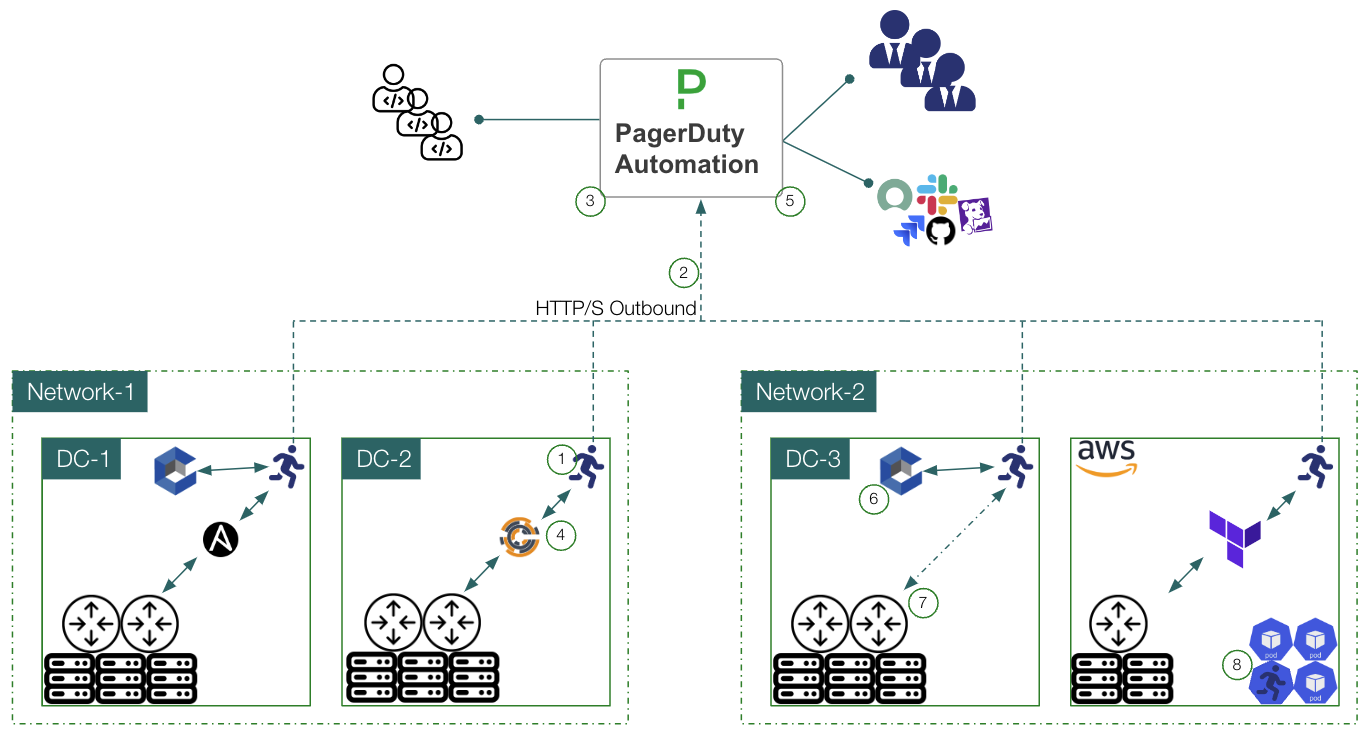
- The Runner uses a polling model to pick up work from Process or Runbook Automation. During each polling cycle the Runner checks for executions that it is responsible for.
- Communication from the Runner to Runbook Automation happens over
HTTPSand is initiated from the Runner. This implies that no inbound firewall ports need to be open for the Runner. - Tasks come into the Runner's queue from users and tools that are interfacing with Runbook Automation.
- The Runner retrieves tasks from the response of queries to Runbook Automation and performs them in the remote environment.
- Output of the task is sent back to Runbook Automation for logging and reporting.
- The output or result of the tasks can then be used to trigger subsequent tasks or workflows.
- The Runner can use secrets retrieved from a secrets provider that is not directly accessible from Runbook Automation.
- Secrets retrieved this way stay within the Runner's environment and are not sent back to Runbook Automation.
- The Runner can use existing automation tools or communicate directly with infrastructure and APIs in the remote environment.
- The Runner can be used to discover inventory in secure or remote environments.
- The Runner can be deployed as a container within Kubernetes clusters to perform actions within the cluster.
For more details on how the Runner operates, see Runner Concepts & Architecture.
Replicas Overview
Runners are composed of one or more Replicas. Each Replica is a separate instance of the Runner that can be deployed on different servers, virtual-machines or containers. Replicas can be used to scale the Runner's capacity and provide redundancy.
When a task is assigned to a Runner - such as a Job execution, fetching nodes or retrieving secrets - then any Replica of that Runner can pick up the task. This allows for load balancing and fault tolerance.
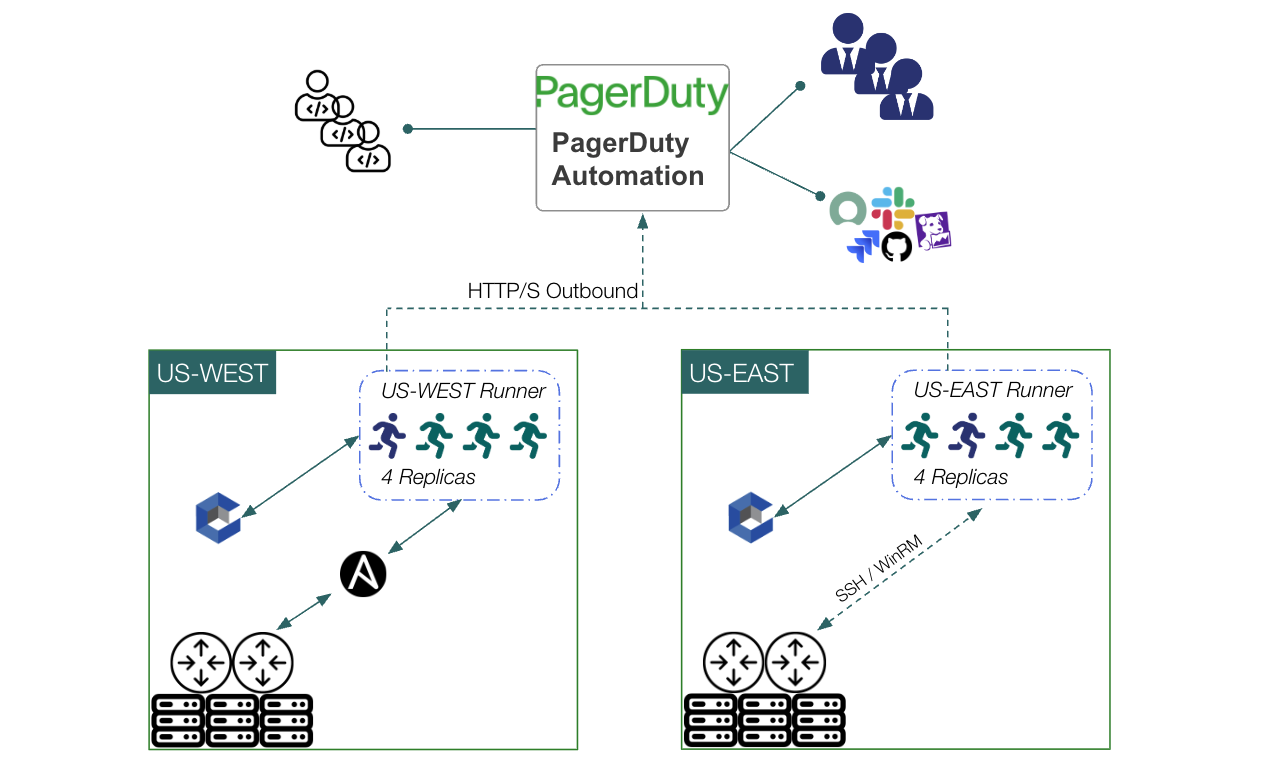
For more details on how Replicas operate, see Runner Replicas.
Enabling the Latest Runner Features
For Runbook Automation Self-Hosted 6.0 and later, rundeck.feature.runner.enabled, rundeck.feature.distributedAutomation.enabled, and rundeck.feature.runnerReplicas.enabled default to true. You normally do not need to set them unless you turned a capability off and need to turn it back on, or you are aligning an older configuration with the current defaults. See Upgrading to Rundeck 6.0 — Feature flags.
On 5.x self-hosted (and some longer-lived configs), distributedAutomation and runner replicas often had to be enabled explicitly; the notes below and linked pages may still describe that path.
rundeck.feature.runner.enabled=trueenables the Runner platform.rundeck.feature.distributedAutomation.enabled=trueenables distributed automation (runner tags, project runner management, plugins on the Runner, and related UI/API).
Enabled by Default for Docker, SaaS, and Self-Hosted 6.0+
Runner-related flags have been enabled on Docker installations since v4.5.0 and are enabled by default for Runbook Automation SaaS. Self-hosted 6.0+ also defaults distributedAutomation and runnerReplicas to on. Confirm System Configuration if anything still sets them to false.
Upgrading from versions prior to 4.11
If using the Enterprise Runner prior to version 4.11 and want to upgrade and enable the latest Runner features, follow these steps:
- Ensure
rundeck.feature.distributedAutomation.enabledistruein System Configuration (on 6.0+ it is already on by default unless overridden). - Upgrade the Runners to the latest version.
It may also be helpful to review the latest Runner features.
- Project Runner Management allows users to create and manage Runners within Projects.
- Runner as a Node provides a native method for representing the Runner as a node in the node inventory.
- Automatic Runner Selection provides a method for automatically selecting Runners based on node filters.
- Manual Runner Selection provides a method for manually selecting Runners within the Job definition.